Bar Types
TickMint separates how bars are built (the periodicity, chosen in the timeframe menu) from how bars are drawn (the candle type). Any candle type can be combined with any bar type, so a 40-tick Range chart can be shown as candlesticks, Heikin-Ashi or a footprint.
Choose a periodicity
Click the timeframe in the panel header to open the menu. Presets are grouped by bar type; the first preset listed for each non-time group is its default.
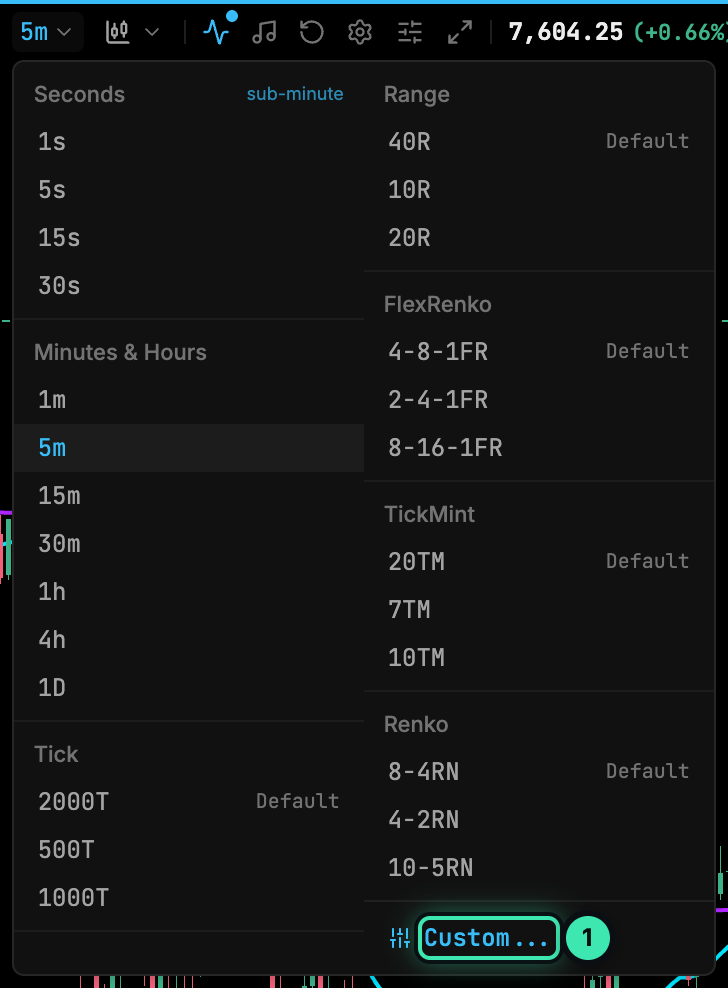
- Custom...: open the bar periodicity editor to enter any value.
| Group | Presets | Suffix |
|---|---|---|
| Seconds | 1s, 5s, 15s, 30s | s |
| Minutes & Hours | 1m, 5m, 15m, 30m, 1h, 4h, 1D | m, h, D |
| Tick | 2000T, 500T, 1000T | T |
| Range | 40R, 10R, 20R | R |
| FlexRenko | 4-8-1FR, 2-4-1FR, 8-16-1FR | FR |
| TickMint | 20TM, 7TM, 10TM | TM |
| Renko | 8-4RN, 4-2RN, 10-5RN | RN |
Bar types
| Type | Built from | Parameters (custom editor) | Notes |
|---|---|---|---|
| Time | Clock time | Interval 1–9999 and a unit: Seconds, Minutes, Hours, Days | Daily bars follow the CME session (18:00–17:00 ET). Sub-minute bars are built from tick history |
| Tick | A fixed number of trades | Trades 1–100,000 | A new bar starts every N trades |
| Range | Price range | Range 1–10,000 ticks | A bar closes once its high–low range reaches N ticks |
| FlexRenko | Price movement in ticks | Trend 1–1000, Reversal 1–2000, Offset 0–100 (ticks) | Trend sets the move needed to continue in the same direction, Reversal the move needed to turn, Offset where the next bar’s open is drawn relative to the prior close. Written trend-reversal-offsetFR, e.g. 4-8-1FR |
| TickMint | Price movement in ticks | Brick 1–1000 ticks | TickMint’s own brick type: a bar completes after a move of one brick; a move of one brick against the trend reverses it. Written 20TM |
| Renko | Price movement in ticks | Brick 2–1000, Trend 1–1000 (ticks) | Brick must be greater than Trend. Written brick-trendRN, e.g. 8-4RN |
Create a custom periodicity
- Open the timeframe menu and click Custom… (1).
- Pick a Bar Type. The editor shows only the inputs for that type and loads its default (1m, 2000T, 40R, 4-8-1FR, 20TM or 8-4RN).
- Enter the values. For time bars, also choose the unit.
- Press Enter or click out of the field to apply. Values outside the allowed range are clamped.
If a required field is empty the editor shows ”… is required”. For Renko, a brick that is not larger than the trend shows “Brick must be greater than Trend”.
The same Bar Type and Interval controls are available in Chart panel settings → Candle settings → Bar interval.
History depth
How many days are loaded depends on the bar type. Set the limits per panel in Chart panel settings → Candle settings → Historical data range:
| Tier | Default | Maximum |
|---|---|---|
| Intraday | 3 days | 30 days |
| Hourly | 90 days | 365 days |
| Daily | 365 days | 1825 days |
Charts built from tick history (tick bars, seconds, footprint, or any chart with Tick replay on) are capped at 10 days.
Candle types
The candle-type menu in the panel header changes only how bars are drawn.
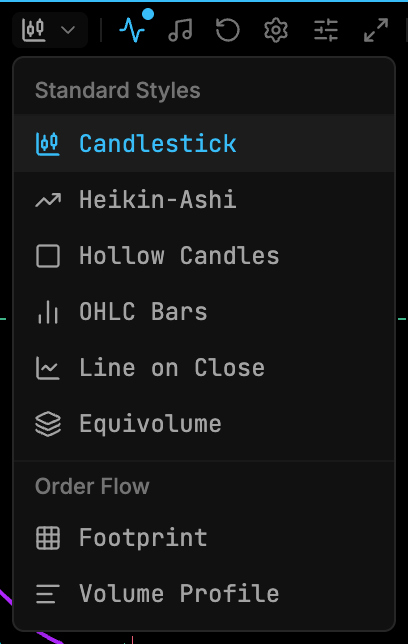
| Group | Style | Description |
|---|---|---|
| Standard styles | Candlestick | Filled body with wicks |
| Heikin-Ashi | Smoothed (averaged) candles | |
| Hollow Candles | Hollow / filled bodies | |
| OHLC Bars | Open-high-low-close bars | |
| Line on Close | A line through the closes | |
| Equivolume | Bar width scales with volume | |
| Order flow | Footprint | Bid × ask volume per price row. See Order Flow Footprint |
| Volume Profile | Volume-at-price profile per bar |