SIM mode
SIM-1 is TickMint’s built-in paper trading account. It runs entirely inside the app and fills your orders against live Rithmic market data. Nothing is sent to your broker.
Select SIM-1
Open the account switcher in the header and pick SIM-1 under Paper Trading.
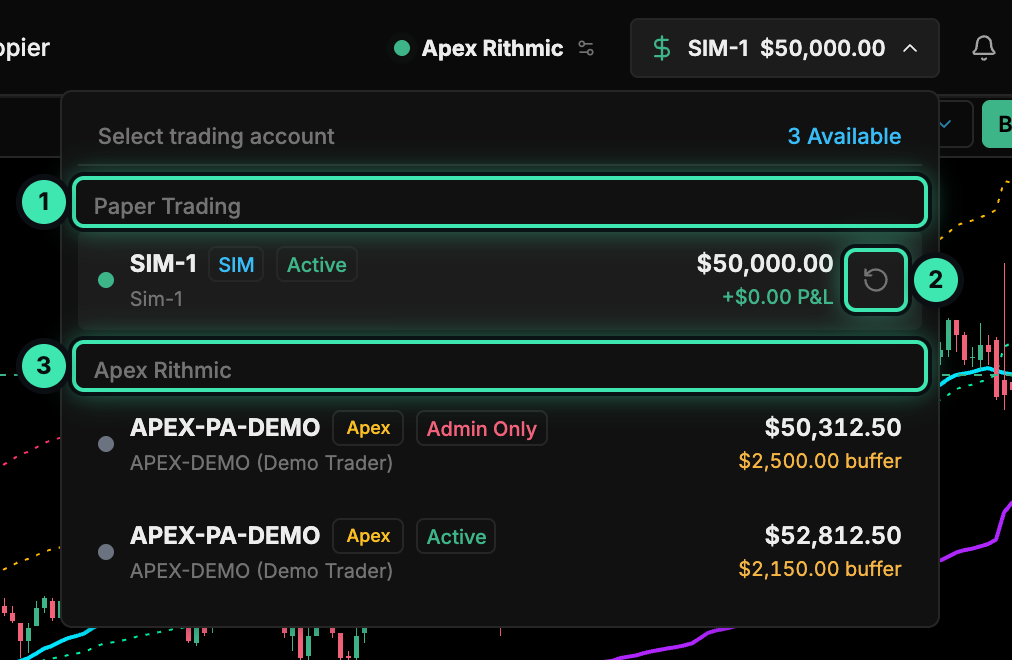
- Paper Trading: the built-in SIM-1 account.
- ↻ Reset the SIM-1 balance.
- Broker accounts from your Rithmic connection.
How SIM-1 works
| Behavior | Details |
|---|---|
| Where it runs | Client-side, in the TickMint window. The gateway refuses orders for SIM accounts, so they can never reach Rithmic. |
| Data | Needs a live Rithmic feed. Without ticks, orders won’t fill. |
| Starting balance | $50,000 by default |
| Limit orders | Fill as soon as price touches the limit |
| Stop orders | Fill at the stop price |
| Market orders | Fill immediately at the current price |
| Slippage and commission | None |
| Margin | $1,500 per contract, used for the available-margin figure |
| Confirmation | SIM-1 orders execute instantly with one click. The live-order confirmation setting doesn’t apply. |
Brackets and ATM strategies work on SIM-1 the same way they do on a live account. See ATM brackets.
Where SIM data is stored
The SIM-1 account metrics (balance and P&L) and its trade history are saved in the app’s local storage on this computer, so they survive restarts. The trade history keeps the last 500 trades.
Reset the balance
You can reset SIM-1 from two places:
- The ↻ button on the SIM-1 row of the header account menu.
- The ↻ Reset Simulation Balance button on the SIM-1 row of the Accounts tab in the trading dock.

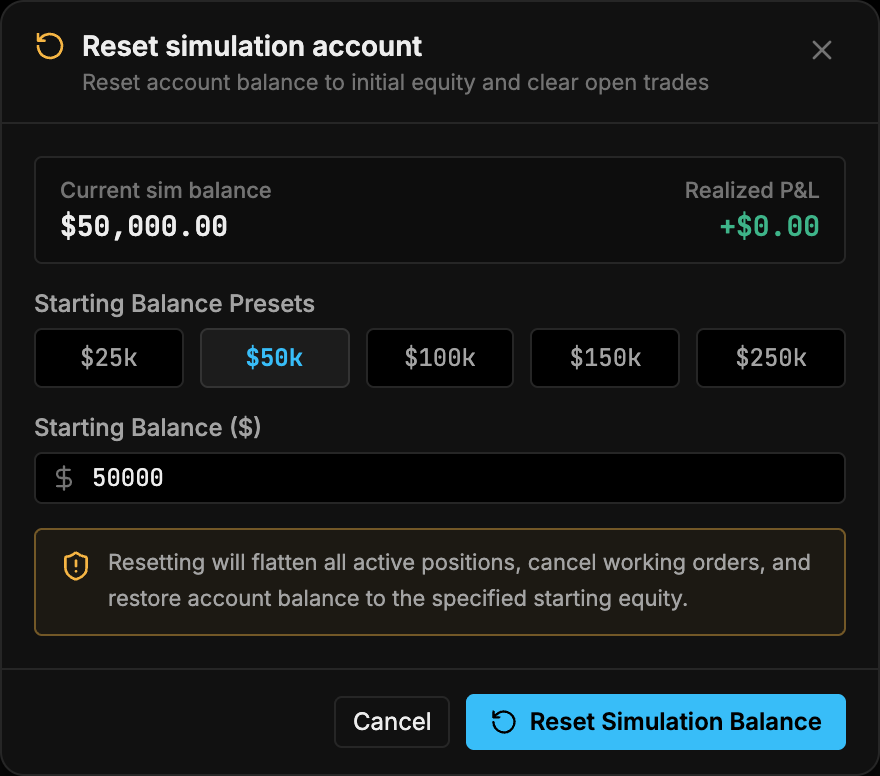
Both open the Reset simulation account dialog:
- Check the current balance and realized P&L at the top.
- Pick a starting balance preset ($25k, $50k, $100k, $150k or $250k), or type your own in Starting Balance ($).
- Click Reset Simulation Balance.
SIM-1 and Market Replay
Market Replay uses its own simulated account, REPLAY-1, separate from SIM-1, so practicing on recorded data doesn’t touch your SIM-1 balance. See Replay mode.