Market Replay
Market Replay plays back a past CME trading day print by print and lets you trade it on a local account called REPLAY-1. Nothing is sent to a broker while replay is active.
Limits at a glance
| Item | Limit |
|---|---|
| Speeds | 1×, 2×, 5×, 10×, 25×, 50×, 100× |
| Instruments per session | Up to 4 |
| How far back | To the current front contract’s roll date, and never more than 90 days. Expired contracts can’t be replayed. |
| Days you can pick | Weekdays before today. Weekends and today are rejected. |
| Market depth | None. Replay carries trades only. |
| Sessions per gateway | One. Replay is exclusive while it runs. |
| Account | REPLAY-1 only. It starts at $50,000 by default. |
For recent days, replay uses tick history. Older days inside the window replay from 1-second bars. For those days the session picker shows a warning, and charts show a Reduced fidelity (1s bars) chip. In that mode there is no per-print tape and the footprint is approximate.
Start a replay
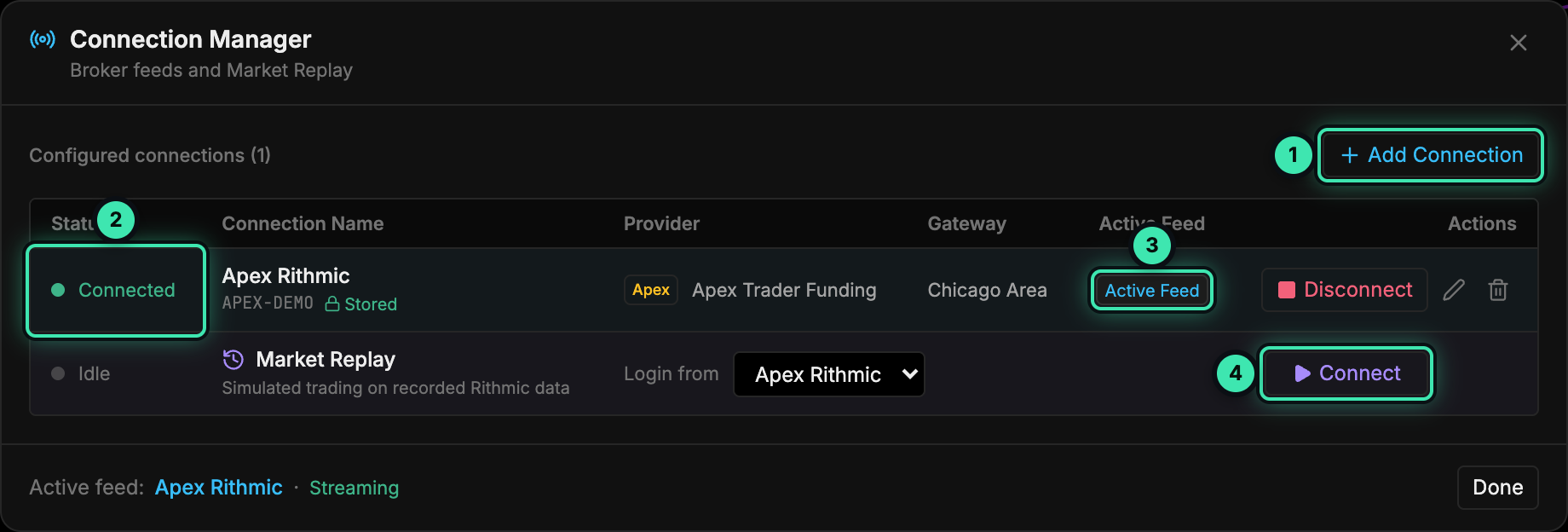
- Add Connection: add a Rithmic login first if you don't have one.
- Connection status.
- Active Feed: the live market-data connection.
- Connect on the Market Replay row starts replay. Its tooltip warns that it ends all live connections.
-
Click the connection status button on the right of the header to open the Connection Manager.
-
On the Market Replay row, pick the Rithmic connection to log in with from Login from. Replay never stores a password of its own and never connects on startup.
-
Click Connect (4). A confirmation dialog lists every connection that will be disconnected, including the local SIM-1 simulator, and any open live positions or working orders. Those orders and positions keep running at Rithmic, so you have to tick the acknowledgement before replay can start.
-
Fill in the Market Replay — choose a day dialog:
Field Notes Instruments (up to 4) Defaults to the instruments on your charts. Use Add instrument… to add more. Trading day Limited to the replayable range. For each instrument, the dialog shows the available dates and how many days of tick data exist. Start at Globex open (17:00 CT, the previous evening), Europe (02:00 CT), RTH open (08:30 CT), or Custom. Labels and custom times use your workstation timezone. Times in the 16:00–17:00 CT daily break are rejected. Starting balance REPLAY-1 balance. Default $50,000. Commission / side Default 0. Slippage (ticks) Default 0. Limits fill only when price trades through Off by default, so limits fill on touch. Stops fill at the gapped price Off by default. -
Click Start replay. A REPLAY transport bar appears and the window gets a fuchsia outline.
Transport controls
| Control | Shortcut | Notes |
|---|---|---|
| Play / pause | Space | |
| Slower / faster | [ / ] | Steps through 1, 2, 5, 10, 25, 50 and 100×. The speed selector does the same. |
| Step one print | button | |
| Step one bar | button | |
| Jump to time | time field | Uses your workstation timezone. |
| Seek | click the timeline | Bright = played, dim = buffered. |
| Reset | button | Restores REPLAY-1 to its starting balance. |
| Change day | button | Reopens the day picker. Positions are flattened. The balance carries over unless you tick Reset REPLAY-1. |
| End Market Replay | button | Ends the session. See below. |
When the replayed session reaches its close, a dialog shows Net P&L, Trades, Win rate, Commission, Max drawdown and Net liquidity. It offers Continue (next trading day), Change day or End replay. Continuing or changing day flattens REPLAY-1.
What changes while replaying
- Orders stay local. Every order action routes to the local replay simulator: market, limit, stop, brackets, modify, cancel, flatten and reverse. As a second guard, the gateway refuses live order commands with
MARKET_REPLAY_ACTIVE. - Accounts. REPLAY-1 is the only account you can select. SIM-1 is hidden and frozen, and it’s restored unchanged when replay ends. Replay fills never go into the Journal or the execution history.
- No depth. DOM depth shows ”—”. Market Depth, Liquidity Heatmap, Iceberg and Order Book Imbalance are not drawn, and a “No depth in Replay” chip appears.
- Clock. Session timers, bar countdowns and time-based indicators follow the replay clock, not the wall clock.
- Alerts are evaluated against replayed prices but only show a local
[REPLAY]toast. They are never sent to external channels or the alert log. See Alerts & webhooks. - Other windows. Other TickMint windows show “Market Replay is active in another window — trading and connections are locked here until it ends.”
- Order-flow history before your start time is approximate. Charts are seeded from time-based bars, and those carry no bid/ask volume split.
End replay
Click End Market Replay on the transport bar or in the session-ended dialog, or disconnect the Market Replay row. This stops playback, discards REPLAY-1, restores SIM-1 and your previous account selection, and reopens the Connection Manager.
Errors
| Message / state | Meaning |
|---|---|
| Session not found, with Change day offered | The replay session expired or was evicted. Pick the day again. |
| Retry on the transport bar | Replay data is unavailable, for example because the history plant is down. |
| “availability unavailable (…)” in the day picker | The gateway couldn’t fetch the date range for that instrument. |
See also SIM-1 mode and Troubleshooting.